
CompTIA A+ Study Plan From a Best-Seller Author — How to Pass in 8 Weeks
Eight weeks, roughly ten hours a week, and a schedule built around how the exam is actually weighted — not around how thick the textbook is.


In this article
Most people fail CompTIA A+ for one of two reasons. They either study for six months, lose momentum and forget the early material, or they cram for ten days and get destroyed by the performance-based questions. Eight weeks is the window that avoids both.
This is the schedule I give candidates I coach, and it is the same structure the CompTIA A+ Core 1 and Core 2 Study Guides for Pros are built around. It assumes you work full time and can find around ten hours a week. That is two hours on four weeknights, plus a longer session at the weekend.
Why eight weeks is the right number
A+ is two exams — Core 1 (220-1201) and Core 2 (220-1202) — and you need both to be certified. Each one is 90 questions in 90 minutes, with a mix of multiple choice and performance-based tasks. That is a lot of surface area, but it is not deep. The material rewards breadth and recall far more than it rewards understanding any single topic profoundly.
Recall decays. If you spread A+ over five months, you will spend the last month relearning what you covered in the first. Eight weeks is long enough to cover everything twice and short enough that the first pass is still in memory when you sit the exam.
Schedule Core 1 for the end of week four and Core 2 for the end of week eight, and pay today. A booked exam with money attached is the single most reliable motivator in certification study. Every candidate I have coached who left booking until "when I feel ready" took twice as long.
Study the weighting, not the page count
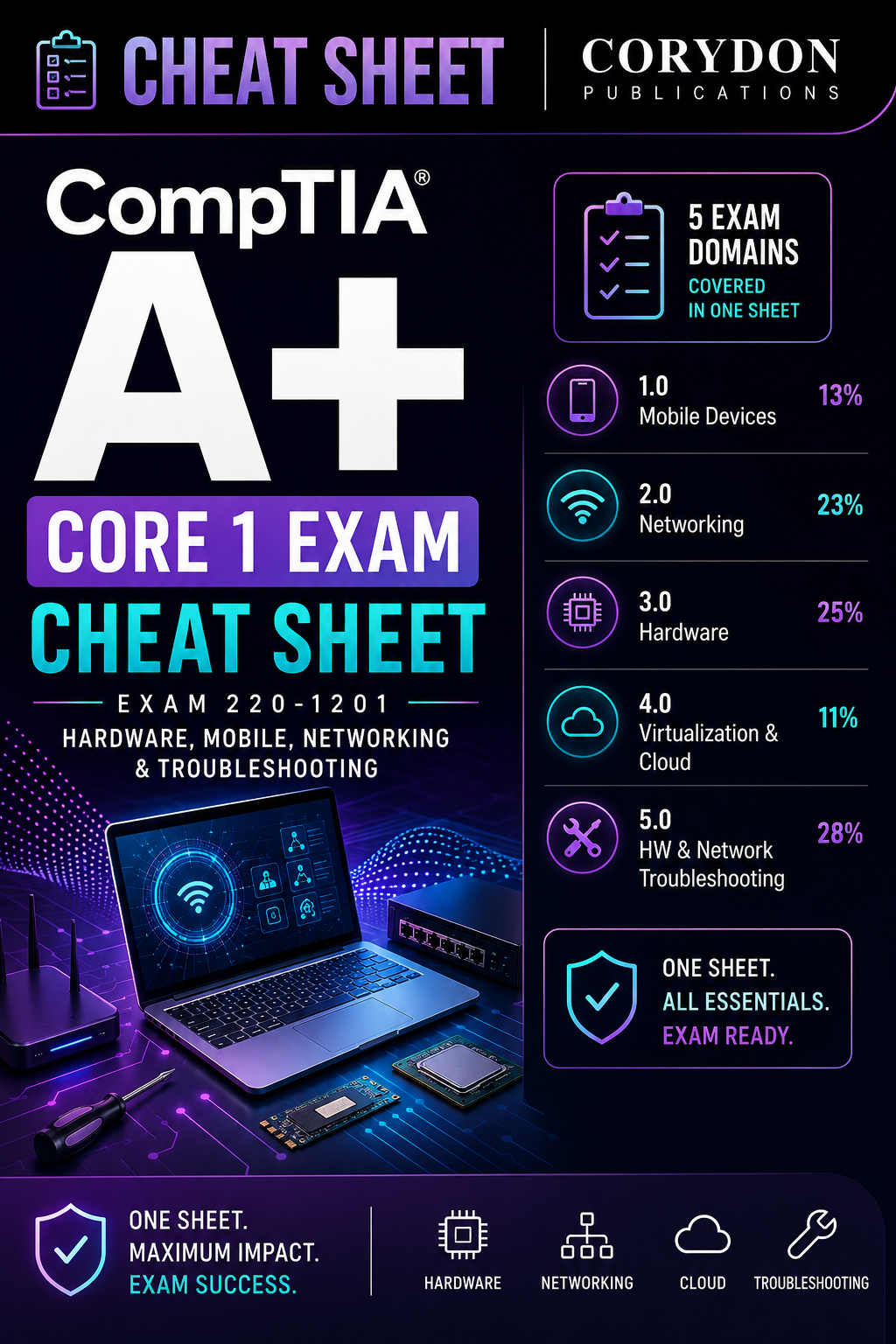
CompTIA publishes exactly how much each domain is worth, and the weighting is not even. Hardware and troubleshooting dominate Core 1. Operating systems and security dominate Core 2. Yet most study guides give every chapter roughly the same number of pages, which quietly encourages you to spend equal time on a domain worth 11% and one worth 28%.
Read that chart as a time budget. Troubleshooting and hardware together are 53% of Core 1, so they should get roughly half your Core 1 hours. Virtualisation and cloud is 11% — worth knowing, not worth a week.
The week-by-week plan
Weeks one to four are Core 1. Weeks five to eight are Core 2. Each week follows the same rhythm: learn new material on weeknights, then use the weekend session to do practice questions on everything covered so far — not just that week.
| Week | Focus | Weekend session |
|---|---|---|
| 1 | Mobile devices, laptop hardware, display types | 40 questions, domains 1 & 3 |
| 2 | Networking: ports, protocols, cabling, wireless standards | 40 questions, domain 2 |
| 3 | Hardware: storage, RAM, CPUs, power, printers | 60 questions, domains 1–3 |
| 4 | Troubleshooting methodology + virtualisation. Sit Core 1. | Full 90-question mock |
| 5 | Windows install, config, and the command line | 40 questions, domain 1 |
| 6 | Security: malware, social engineering, hardening | 40 questions, domain 2 |
| 7 | Software troubleshooting, macOS and Linux basics | 60 questions, domains 1–3 |
| 8 | Operational procedures, safety, documentation. Sit Core 2. | Full 90-question mock |
The weekend session is the part people skip, and it is the part that works. Answering questions on material from three weeks ago is what moves it from recognition into recall. If you only ever test yourself on this week's chapter, you are measuring short-term memory.
The commands you must know cold
Core 2 will put you in a simulated command prompt and ask you to fix something. There is no partial credit for knowing roughly what a command does. These are the ones that appear most often, and you should be able to type them without thinking.
Windows — Core 2 essentials# Network configuration and DNS
ipconfig /all              # full adapter detail, MAC, DHCP, DNS
ipconfig /flushdns         # clear the DNS resolver cache
ipconfig /release          # drop the current DHCP lease
ipconfig /renew            # request a new one

# Connectivity troubleshooting
ping 8.8.8.8              # is it the network or is it DNS?
tracert corydon-publications.com   # where the path breaks
nslookup example.com     # query DNS directly
netstat -ano              # open ports plus owning process ID

# File system and integrity repair
sfc /scannow              # verify and repair system files
chkdsk C: /f /r           # fix errors, recover readable data
DISM /Online /Cleanup-Image /RestoreHealth
gpupdate /force           # reapply Group Policy immediately
When a performance-based question drops you at a prompt, read the whole scenario before typing anything. Half of them tell you the symptom in the first line and the constraint in the last — and the constraint is usually what rules out the obvious answer.
Four mistakes that cost people the pass
- Studying Core 1 and Core 2 together. They are separate exams with separate blueprints. Mixing them doubles the material you are holding at once and halves your confidence in both.
- Watching videos instead of answering questions. Video feels productive because it is comfortable. Questions feel bad because they expose gaps — which is the entire point.
- Ignoring operational procedures. Domain 4 of Core 2 is safety, documentation, change management and environmental handling. It is 21% of the exam and it is the domain candidates most often dismiss as "common sense" and then fail.
- Not simulating the clock. Ninety questions in ninety minutes is one minute each, and performance-based tasks eat five. Do at least two full timed mocks before exam day so pacing is muscle memory.
Stick to the eight weeks, respect the weighting, and drill mixed questions every weekend. That is the whole method. It is not clever, but it is what separates the candidates who pass first time from the ones who book a resit.
What to do in the final 48 hours
The last two days before each exam are not for learning new material — that ship has sailed — they are for consolidation and logistics. Spend the final weekend doing one full timed mock, then reviewing only the questions you got wrong. Do not re-read chapters you already know; that feels productive but changes nothing. Your job now is to find the last few soft spots and firm them up.
The night before, stop studying by early evening. Sleep is a genuine performance input on an exam that runs 90 minutes at speed, and a tired brain misreads scenario constraints — which is where careless marks are lost. Pack your ID, confirm your test-centre time or check your online-proctoring setup, and lay everything out so the morning has no surprises. A candidate who slept well and arrived calm outperforms an equally-prepared candidate who crammed until midnight, every single time.
If you fail, resit fast
Some people fail a half. It is not the end of anything — the pass mark is deliberately demanding, and a narrow miss usually means one weak domain rather than a shaky foundation. The mistake is waiting. If you resit within two weeks, the other 80% of the material is still fresh and you only have to shore up the domain that beat you. Leave it three months and you are relearning the whole exam. Book the resit while the detail is still in your head, target the weak domain hard, and go again.
Bundle all three best-sellers and save up to $50
A+ Core 1, A+ Core 2 and PenTest+ in one order — $135 in paperback or $80 for all three ebooks. The cheapest route to both certifications.
See the bundle